
AI that works quietly.
So your business doesn't have to.
Deploy intelligent voice and chat assistants that automate repetitive tasks instantly.

%201.webp)
.webp)
To go live on your website
From one assistant or agent
OpenAI, Gemini, Claude, Sarvam
Covers voice, chat and agent runs

.png)
We believe AI should do more than answer questions.It should take action, complete work, and become a true part of your business.
A future where intelligent agents handle real operations,while people stay focused on what matters most
AI should do more than answer questions. It should take action and finish the work, so your team can focus on what matters
Assistants
The customer-facing AI that talks to people.
One assistant, set up once, that answers on your website, over the phone, and on WhatsApp, Slack, email and social. It speaks and it chats, it answers from your own documents, and it hands off to a human the moment it should.
Chat, browser voice, realtime voice and a live video avatar, all on one assistant
Inbound and outbound calls. Buy a number inside Mayavi, or bring your own
Reach customers on WhatsApp, Slack, email, Telegram, Instagram and Facebook
Drop it on your site with one line of code, or share a public chat link
Guardrails, jailbreak detection and personal-data masking built in
Hands off to your team with full context when a human is needed
Agents
The workers that do the job, not just the talking.
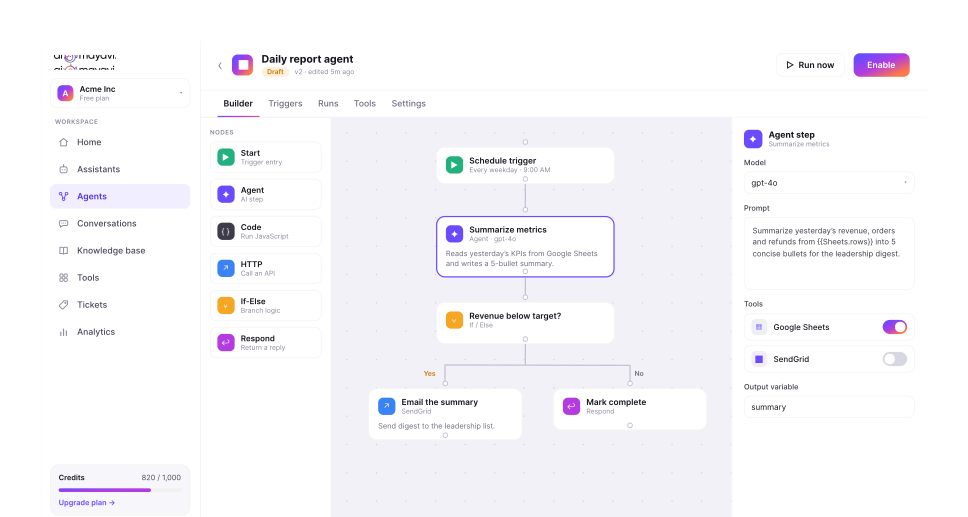
An agent is a worker with its own instructions, tools, memory and triggers. It runs multi-step work from start to finish: look up an order, decide, call an API, update a record, reply. You publish a version, and only that version serves live traffic.
One builder for tools, knowledge, memory, planners, triggers and channels, with versioned drafts
Pick the model per agent: OpenAI, Gemini, Claude, or Sarvam for Indian languages
Starts from a chat, call, schedule, webhook, or a WhatsApp, Slack or email message
Calls your tools and MCP servers to do real work, and opens a ticket when a person is needed
Multi-agent: one agent can call another and delegate to a specialist
Step limits, timeouts and output checks, with a full trace of every action
Automations
A visual builder for the work between the steps.
Agents respond to a trigger. Automations turn one event into a full workflow of AI, logic, approvals, calls and texts that runs around the clock. Drag nodes onto a canvas, connect them and set the logic. No spaghetti, no code.
A drag-and-connect canvas with pan, zoom and a minimap, or a simpler step editor
Nodes for AI, branching, loops, API calls, code, voice calls, SMS and approvals
Starts on a manual run, a webhook, a schedule, a missed call, or the end of a call
Outbound call campaigns for reminders, follow-ups and surveys
Ready-made templates: missed-call SMS and voice follow-up, daily sales report, back-office reconciliation
Test before you publish, roll out gradually, replay any run and roll back in one step
Tools & Integrations
Tools that actually act on your systems.
Connect an account once at the organization level, then attach it to any assistant, agent or automation. Credentials are encrypted, stay inside your org and are reused across tools. Need something custom? Connect any REST API visually, or plug in MCP tool servers.
Ecommerce: Shopify (order, customer, product, tracking and refund lookups)
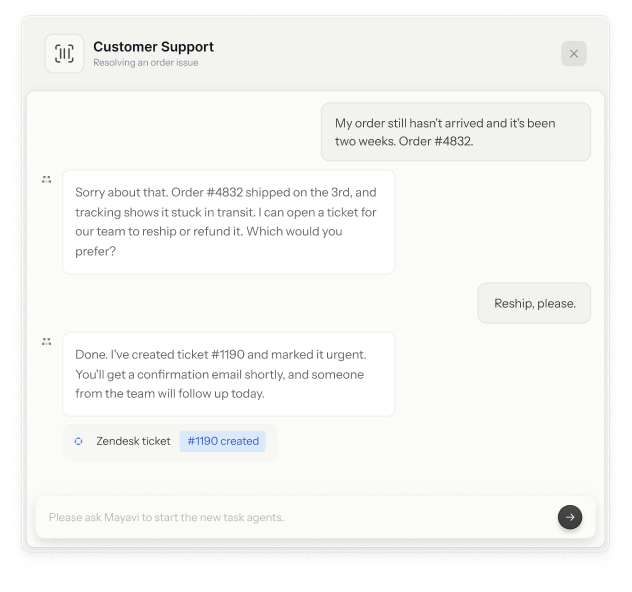
Helpdesks: Zendesk, Intercom and Gorgias. Create or update tickets from any conversation
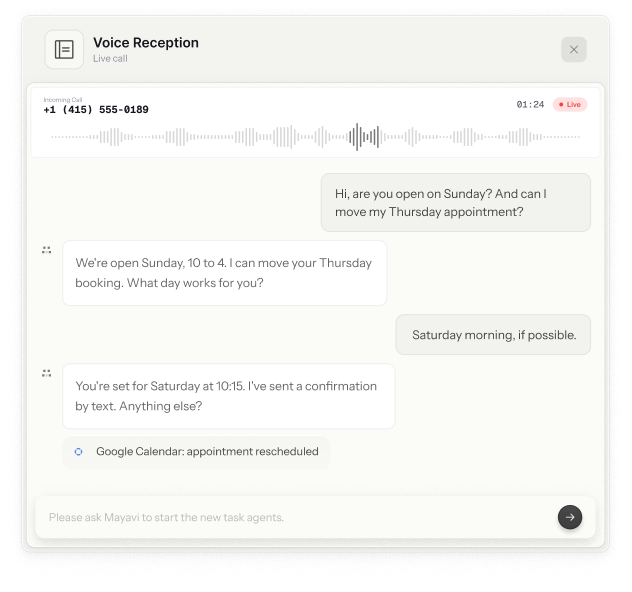
Google: Calendar and Sheets. Book appointments and log leads automatically
Messaging and email: WhatsApp, Slack, Telegram, Facebook, Instagram and SendGrid
Built-in: tickets, lead capture, forms and quizzes, ready without extra setup
Research: live web search, so answers can use current information
Custom: any REST API with templated URLs, plus MCP tool servers
You decide what an agent may do. Switch off any operation, and unsafe addresses are blocked
Build Smarter Support
Customer Support That Works 24/7
Deploy a support assistant that answers product questions, looks up order details, and opens a Zendesk or internal ticket the moment a human is needed. It answers from your own documentation, so replies stay consistent and accurate. Available on chat and voice.
of code
For your Shopify store
An AI teammate for your Shopify store.
Connect your Shopify store and let the assistant answer product questions, check stock, track orders, and guide shoppers to the right item. It reads orders, customers, products, tracking, and refunds, and hands off to a person when it should.
.png)
Turn visitors into leads
Qualify every lead, day or night.
Put an assistant on your site or your social channels that qualifies visitors with a few quick questions, captures their details, and pushes them to your sheet or CRM. When they're ready, it books a call straight into Google Calendar.
FormsLeads
.png)
Answer every call
A front desk that never puts callers on hold.
A voice agent on a dedicated phone number that answers common questions from your hours and policies, books or reschedules appointments on Google Calendar, and escalates anything it shouldn't handle to your team via a ticket.
AI agents are powerful on their own. Businesses need them working together.
The Next Evolution of AI
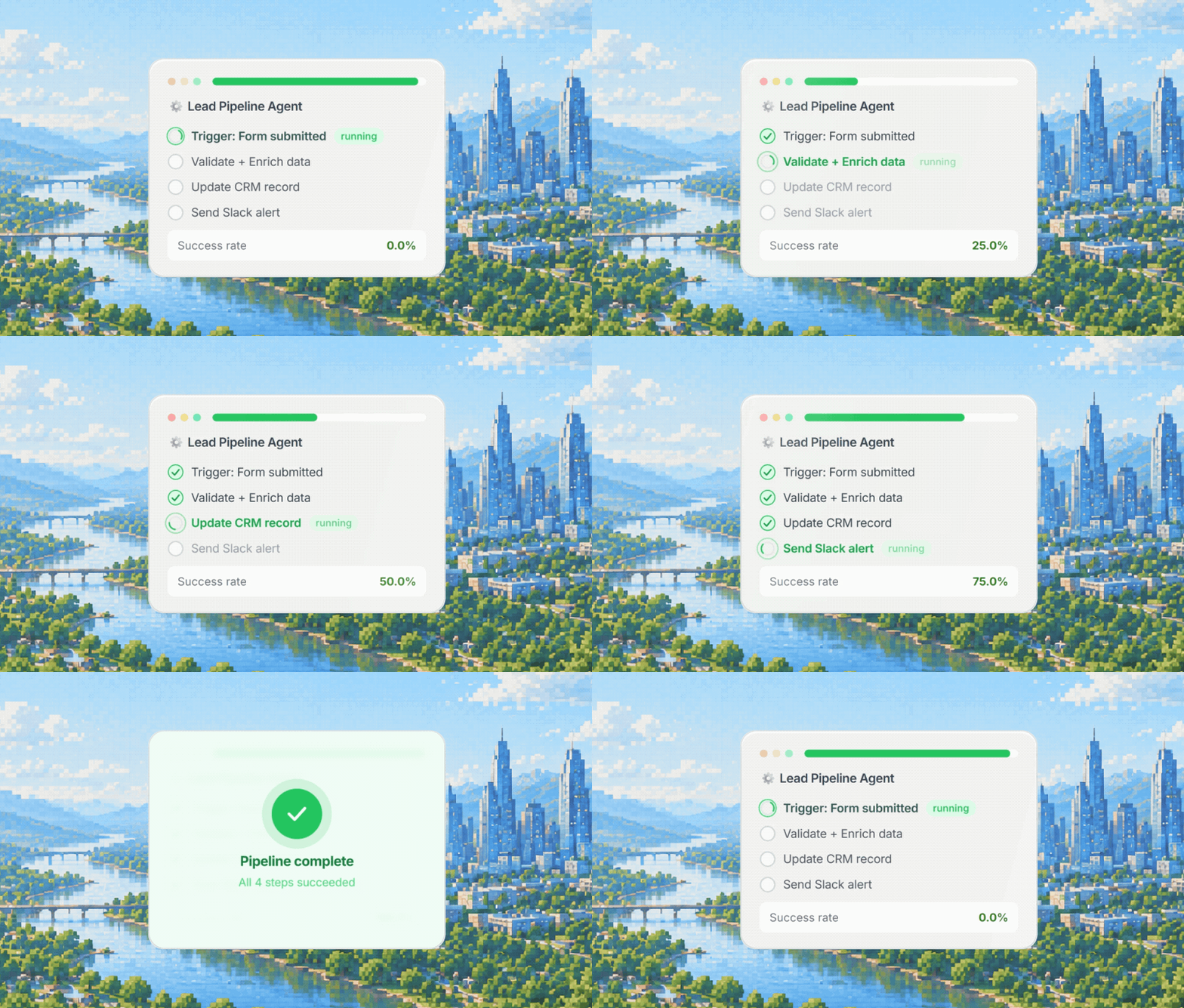
Great AI agents are powerful on their own. Real work needs them working together. In Mayavi, one agent can hand a task to another and delegate to a specialist, so a whole workflow runs as one coordinated system rather than a set of disconnected bots.

Mayavi streamlines your business with intelligent automation.
Enterprise-grade security with full control and compliance.
Shopify Suite
Six AI teammates that run your Shopify store — support, sales, orders, recovery, inventory, and analytics, all working together.
Inside the suite · 5 components
- Shopify Customer Support Assistantassistant
- Order Support Agentagent
- Shopify Sales Assistantassistant
- Abandoned Cart Recovery Agentagent
- Inventory Monitoring Agentagent
Not just conversations. Real execution.
Assistants, agents and automations share one knowledge base, one tool library, one team workspace and one credit balance.

.png)
- Knowledge BaseUpload docs, import pages or paste text. Your AI answers from your content.
- Tools & IntegrationsShopify, helpdesks, Google, WhatsApp, Slack, MCP or any API. Connect once.
- Inbox & TicketsEvery conversation from every channel in one inbox, with human takeover.
- AnalyticsLive activity, conversation volume, assistant performance and AI cost by model.
- Security & GovernanceRoles, approvals, audit log, guardrails and data masking, built in.
Pay for intelligence, not interactions
Your subscription includes the AI brain. You only pay more when your agents do more work.
Managed SaaS
We host, run and maintain everything. Credit-based pricing that scales with your real model and voice usage.
BYOK
We run the platform; you bring your own model and telephony accounts. Provider usage bills directly to you.
Self-hosted
Deploy in your own cloud or on-prem. Licensed with implementation, SSO, audit logs and data residency.
.png)
Let’s build the future together
Transform your teams work with intelligent agents that understand , adapt, and deliver
.png)
Conversational agents that assist users in real-time customer support and engagement.

AI that answer product questions, track orders, capture leads, and escalate to a human when needed.
.png)
Conversational AI that helps customers with appointment booking & rescheduling, doctor's availability, and grievance.
FAQ
The things people ask before they get started with Mayavi.
How does Mayavi's pricing work?
Your subscription includes the AI. Usage is metered in credits, and different models cost different amounts for the same task, so a lighter model costs less than a heavier one. Your bill tracks what your agents actually do, not a flat count of "conversations" or "resolutions."
Which pricing option is right for me?
Mayavi comes in three setups. Managed SaaS is the default: we host and run everything, and you pay in credits based on real usage. BYOK is the same platform, but you bring your own model and telephony accounts, so provider usage bills directly to you with no markup. Self-hosted deploys Mayavi in your own cloud or on-prem, with SSO, audit logs, and data residency, for teams with stricter compliance needs. Most teams start on Managed SaaS. Talk to us if you're not sure which fits.
Do I need my own API keys?
For core features like chat, agents, and standard voice, everything is included in your plan. For optional voice providers such as ElevenLabs or Deepgram, and for telephony like Twilio, you bring your own account and keys. Mayavi handles the orchestration, and you keep the provider relationship.
What happens when I run low on credits?
We never cut off your AI in the middle of a customer conversation. You get a heads-up as you approach your limit, and anything beyond your plan is billed transparently, with no surprise stops.
What's the difference between assistants and agents?
Assistants are the customer-facing side. They handle conversations over chat, voice, and messaging channels. Agents are the workers behind the scenes. They run multi-step tasks, call your tools, and automate operations. Assistants talk to people. Agents do the work.
What is realtime voice, and do I need it?
Realtime voice powers live, natural phone-style conversations. Most teams start with text chat and standard voice, then add realtime voice later for phone support or high-touch calls. It's an add-on, so you only pay for it if you use it.
Can I connect Mayavi to my existing tools?
Yes. Today that includes Shopify, Zendesk, Intercom, Gorgias, Google Calendar, Sheets and Gmail, SendGrid, and Telegram. You can also connect any custom REST API by defining the endpoint, parameters, and authentication visually, no code required. Connect an account once and attach it to any assistant or agent. More integrations are on the way.
How do I embed Mayavi on my website?
One line of code. Add a script tag and a chat widget appears in the corner of your site. Visitors can talk to your assistant by text or voice with no login required, and you control which domains are allowed from your dashboard.